SharePoint Online Classic Experiences Are Changing: Modernization Roadmap for 2027 and 2028
Microsoft is changing classic publishing sites, classic user-created pages, and custom scripting in SharePoint Online. Here is what admins, developers, architects, and intranet owners should do before March 1, 2027 and October 1, 2028.
- Published
- Reading time
- 9 min read
What you’ll learn
- What is changing in SharePoint Online?
- March 1, 2027 Phase 1 changes
- October 1, 2028 Phase 2 changes
- Classic page types affected
- What is not currently in scope?
On this page (22 sections)
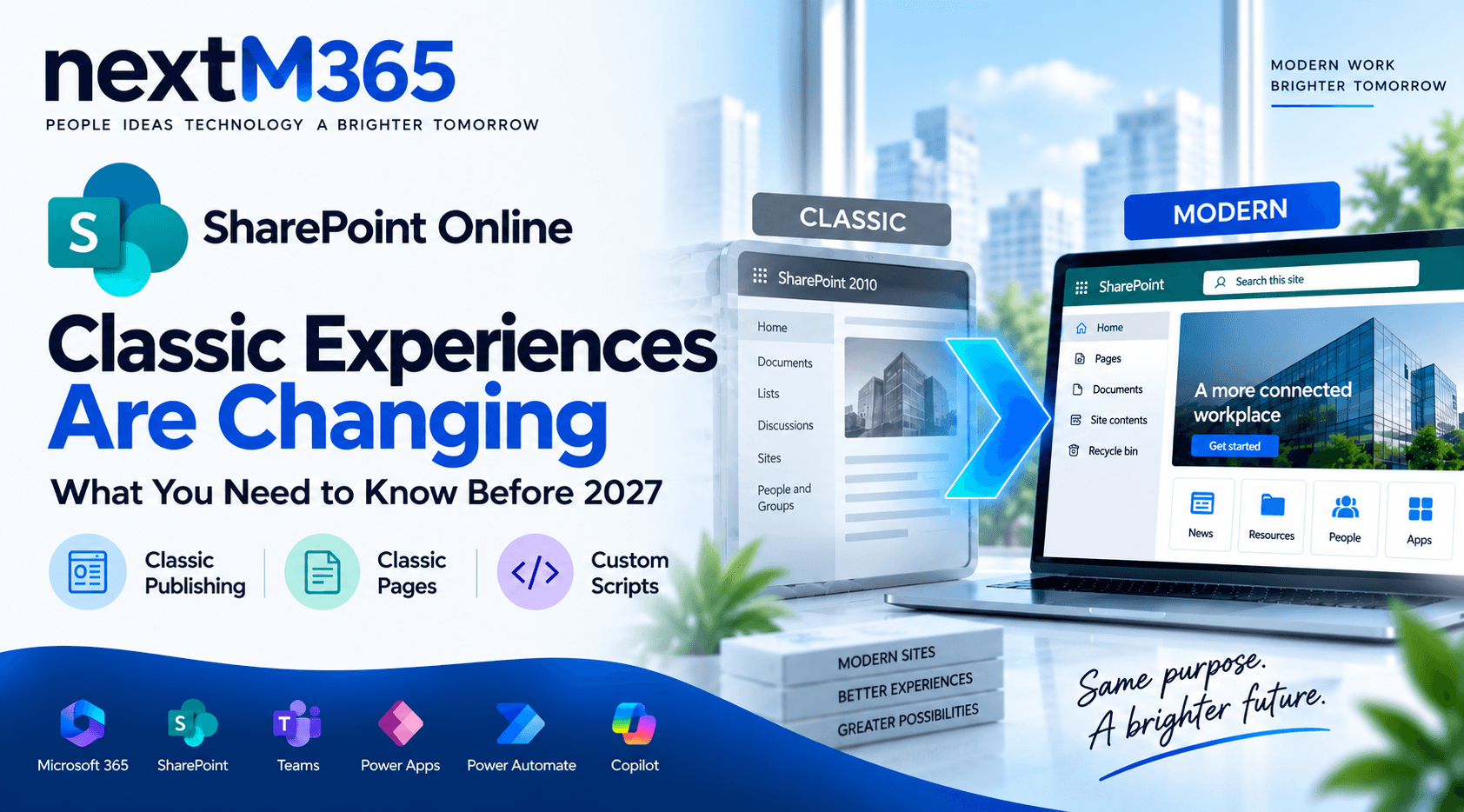
Microsoft has announced upcoming changes to SharePoint Online classic experiences, with rollout milestones beginning on March 1, 2027 and expanding on October 1, 2028. The change is not a sudden deletion of old content. It is a clear signal that classic publishing sites, classic user-created pages, and legacy custom scripting should no longer be treated as a long-term foundation for intranets, portals, and business solutions.
This nextM365 guide rewrites the announcement into practical guidance for SharePoint admins, developers, architects, and intranet owners. The goal is simple: identify where classic SharePoint still matters in your tenant, decide what needs to stay editable, and move important experiences to supportable modern alternatives before the deadlines create operational pressure.
What is changing in SharePoint Online?
The announcement covers three related areas: classic publishing sites, classic user-created pages, and custom scripting. These are the older SharePoint patterns many organizations used for intranets, departmental portals, script editor web parts, content editor web parts, SharePoint Designer pages, page layouts, and highly customized classic experiences.
Microsoft says existing classic page content is not deleted or modified by these phases. The business issue is editability and supportability. If an important HR policy page, legacy department home page, or operational dashboard is still a classic page, users may be able to view it after the relevant date but not create or edit it in the same way.
The strategic message is that modern SharePoint, SharePoint Framework, Power Apps, Power Automate, and Microsoft Graph should replace legacy customization patterns where those pages still serve a business purpose.
March 1, 2027 Phase 1 changes
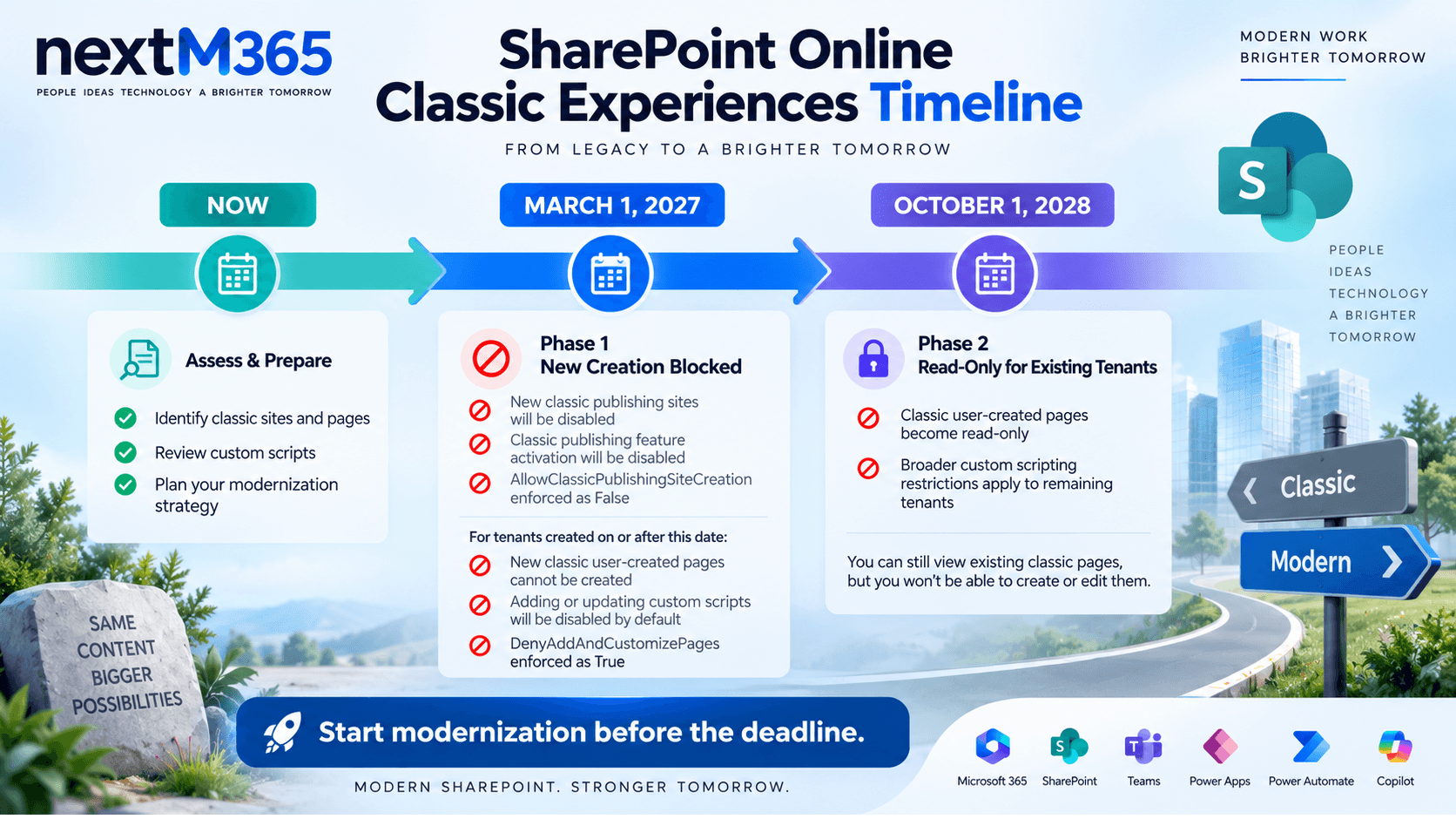
Phase 1 has tenant-wide publishing-site restrictions and additional restrictions for tenants created on or after March 1, 2027.
For all tenants
- New classic publishing sites can no longer be created as site collections or subsites.
- The classic publishing feature can no longer be activated for site collections or subsites.
- The
AllowClassicPublishingSiteCreationtenant setting is enforced asFalseand cannot be changed.
For new tenants created on or after March 1, 2027
- Users cannot create new classic pages.
- Adding or updating custom scripts is disabled by default.
- The
DenyAddAndCustomizePagessite setting is enforced asTrueand cannot be changed.
Practical example: if a new organization starts Microsoft 365 after this date, it should not plan an intranet launch around classic publishing features, classic wiki pages, or script editor customizations. The target architecture should start with modern communication sites, hub sites, modern pages, SPFx where needed, and Power Platform for apps and workflows.
October 1, 2028 Phase 2 changes
Beginning October 1, 2028, the Phase 1 page and scripting restrictions extend to remaining existing tenants. This is the date most established Microsoft 365 environments should treat as the modernization deadline for business-critical classic pages.
- Classic user-created pages become read-only.
- Users can no longer create or edit classic user-created pages.
- Adding or updating custom scripts is disabled by default.
DenyAddAndCustomizePagesis enforced asTrueand cannot be changed.
The safest interpretation is this: if a classic page must remain editable after October 1, 2028, it needs a modernization plan. If it only needs to be retained for record, reference, or historical reasons, it may be archived or left view-only with clear ownership and lifecycle notes.
Classic page types affected
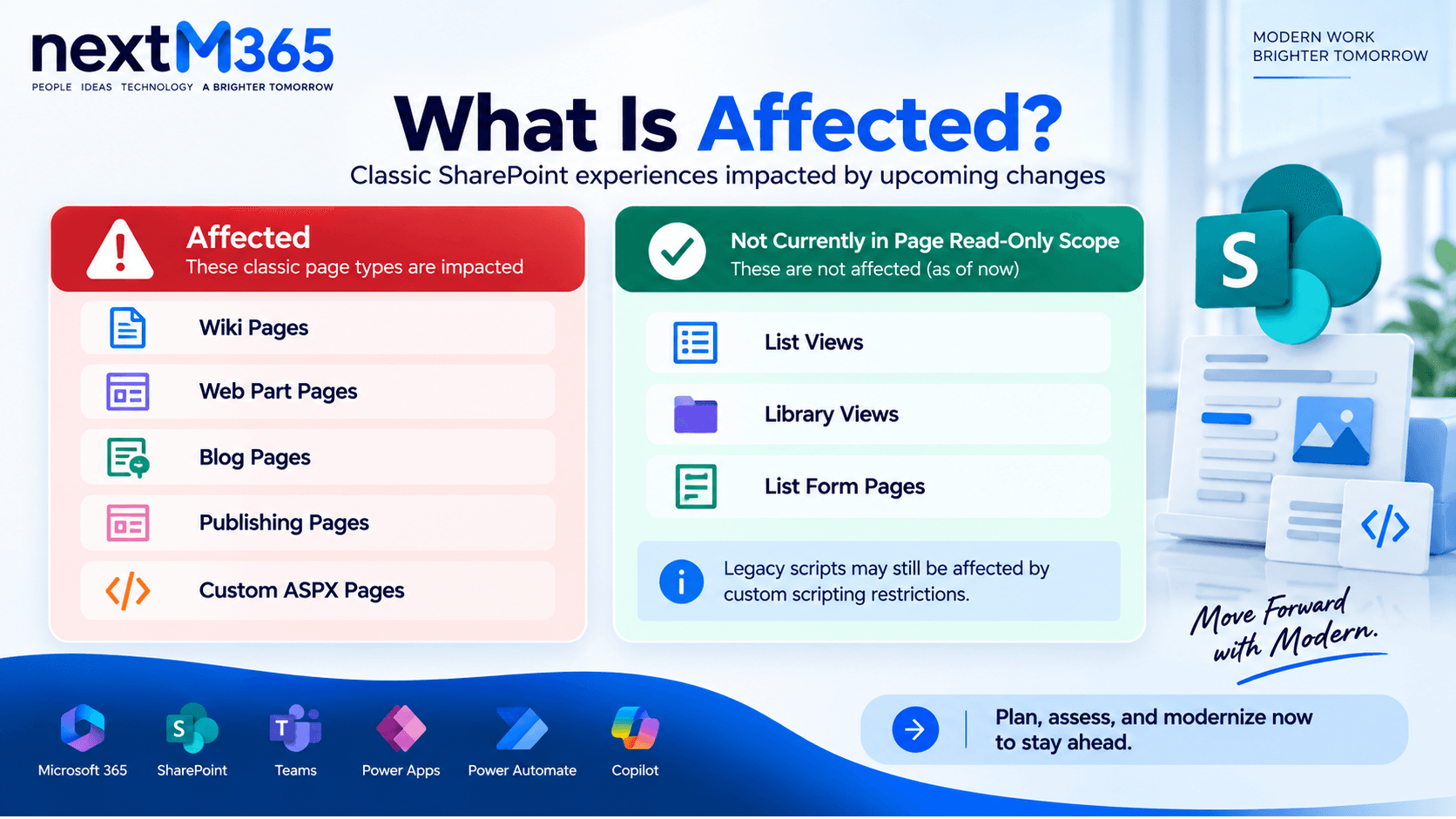
The read-only change applies to classic user-created page types that organizations commonly used before modern SharePoint became the default authoring model.
- Wiki pages used for team documentation, lightweight knowledge bases, and department instructions.
- Web Part pages built from classic web parts, including pages that aggregate lists, libraries, reports, or search results.
- Blog pages created through older SharePoint blog functionality.
- Publishing pages used in classic publishing portals, page-layout driven intranets, and communication sites built before the modern model matured.
- Custom ASPX pages created with SharePoint Designer or third-party solutions.
What is not currently in scope?
Microsoft says other classic experiences, including list and library views and list form pages, are not currently in scope for the page read-only change. That distinction matters. A classic list view is not automatically the same risk as a classic publishing page.
However, do not use that as a reason to ignore customizations. If a list view, form page, or older business process depends on injected JavaScript, user custom actions, SharePoint Designer behavior, old workflow publishing, or unsupported file types, the custom scripting restrictions can still affect what users can add or update.
Impact on custom scripting and legacy customizations
The custom scripting part of the announcement is where many legacy solutions will feel the most pain. Classic SharePoint often allowed power users and developers to add behavior directly through script editor web parts, content editor web parts, custom actions, master pages, page layouts, and SharePoint Designer changes. That model is flexible, but it is hard to govern and risky at tenant scale.
When custom script is blocked, Microsoft documents impacts across classic features such as saving sites or lists as templates, sandbox solutions, SharePoint Designer operations, certain file types, old workflow publishing, custom actions, Design Manager, classic web parts, and master page or page layout changes. Existing items may continue to work in some cases, but creating or updating them becomes constrained.
For developers, the important point is that SPFx is the supported extensibility path for SharePoint Online. Do not rebuild a script editor snippet as another unsupported script injection. Convert it into a governed SPFx web part, SPFx extension, Power App, Power Automate flow, Azure-hosted service, or Microsoft Graph integration depending on what the customization actually does.
What admins, developers, architects, and intranet owners should do now
SharePoint admins
- Inventory classic publishing sites, classic pages, and sites where custom script is allowed.
- Use Microsoft Purview audit events and assessment tooling to understand page creation, edit, and view activity.
- Identify business owners for important classic sites and pages.
- Communicate the dates early so departments do not keep investing in classic authoring.
Developers
- Find script editor, content editor, custom action, SharePoint Designer, and custom ASPX dependencies.
- Classify each customization by purpose: UI, form logic, workflow, integration, reporting, navigation, or branding.
- Move custom UI to SPFx where SharePoint-native extensibility is required.
- Use Microsoft Graph or SharePoint REST APIs through properly governed apps, not page DOM scraping.
Architects
- Define a target modern SharePoint architecture with hubs, communication sites, team sites, metadata, permissions, and lifecycle rules.
- Decide which legacy intranet areas should be retired, replaced, modernized, or rebuilt.
- Review security, compliance, data residency, external sharing, records, and retention before migrating pages.
- Plan pilot waves and rollback notes before broad modernization.
Intranet owners
- Review which classic pages people still use and which pages no longer have value.
- Rewrite outdated pages instead of blindly converting them.
- Use modern page templates, clear ownership, review dates, and page metadata.
- Train publishers to create modern SharePoint pages instead of asking IT for classic page edits.
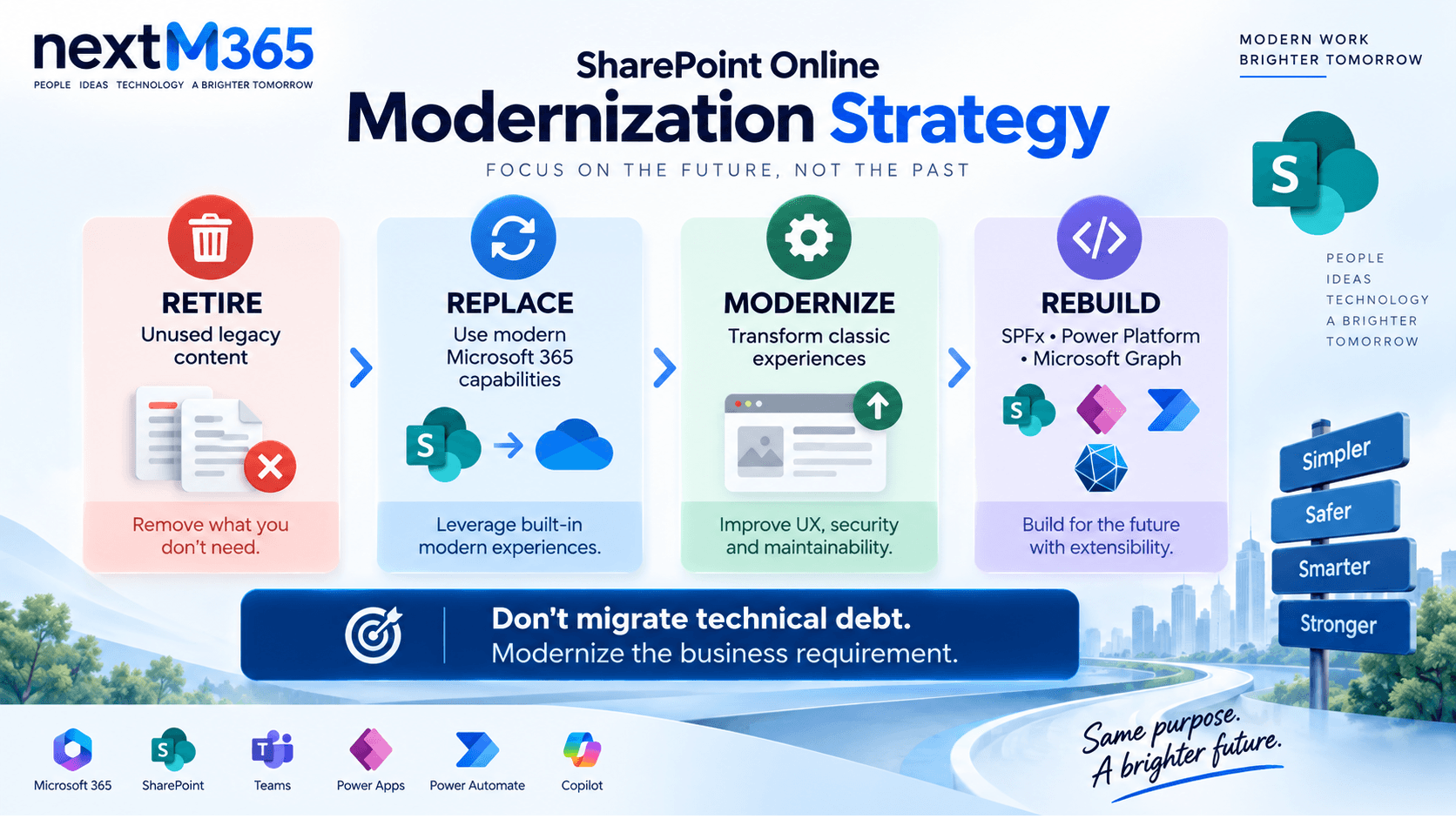
Modernization strategy: Retire - Replace - Modernize - Rebuild
A good SharePoint modernization program does not convert every page mechanically. Some pages should disappear. Some should become standard modern pages. Some need page transformation. Some custom business experiences should be rebuilt properly.
Retire
Retire pages that are obsolete, duplicated, unused, or owned by no one. Archive content where retention requires it, then remove the page from navigation and search-driven user journeys.
Replace
Replace simple classic pages with modern SharePoint pages, news posts, document library views, list views, quick links, highlighted content, text, image, people, events, or file viewer web parts. This is usually the fastest and lowest-risk path.
Modernize
Modernize valuable pages that have current content but older page structure. Page transformation tools and PnP approaches can help, but highly customized layouts still need human review for content quality, accessibility, permissions, links, and web part mapping.
Rebuild
Rebuild legacy solutions when the classic page is really an application, workflow, dashboard, or integration surface. Use SPFx for SharePoint UI, Power Apps for forms and business apps, Power Automate for workflow, Microsoft Graph for Microsoft 365 data access, and Azure services where a durable API or backend is required.
Recommended modern alternatives
| Legacy pattern | Modern alternative | Why it fits |
|---|---|---|
| Classic publishing page | Modern SharePoint communication site page | Better authoring, mobile-ready layout, modern web parts, page metadata, and easier governance. |
| Script Editor or Content Editor web part | SPFx web part or extension | Supported SharePoint extensibility with packaging, deployment, and tenant governance. |
| SharePoint Designer form customization | Power Apps customized form or standalone app | Better form logic, responsive UI, connectors, validation, and maker governance. |
| Classic workflow or script-driven process | Power Automate cloud flow | Modern workflow designer, connectors, approvals, notifications, monitoring, and ownership. |
| Custom ASPX integration page | SPFx plus Microsoft Graph, SharePoint APIs, or Azure API | Cleaner authentication, service boundaries, lifecycle management, and maintainability. |
| Old intranet publishing portal | Modern SharePoint hub architecture with Viva Connections where appropriate | Flatter information architecture, Teams entry point, modern navigation, and improved publishing model. |
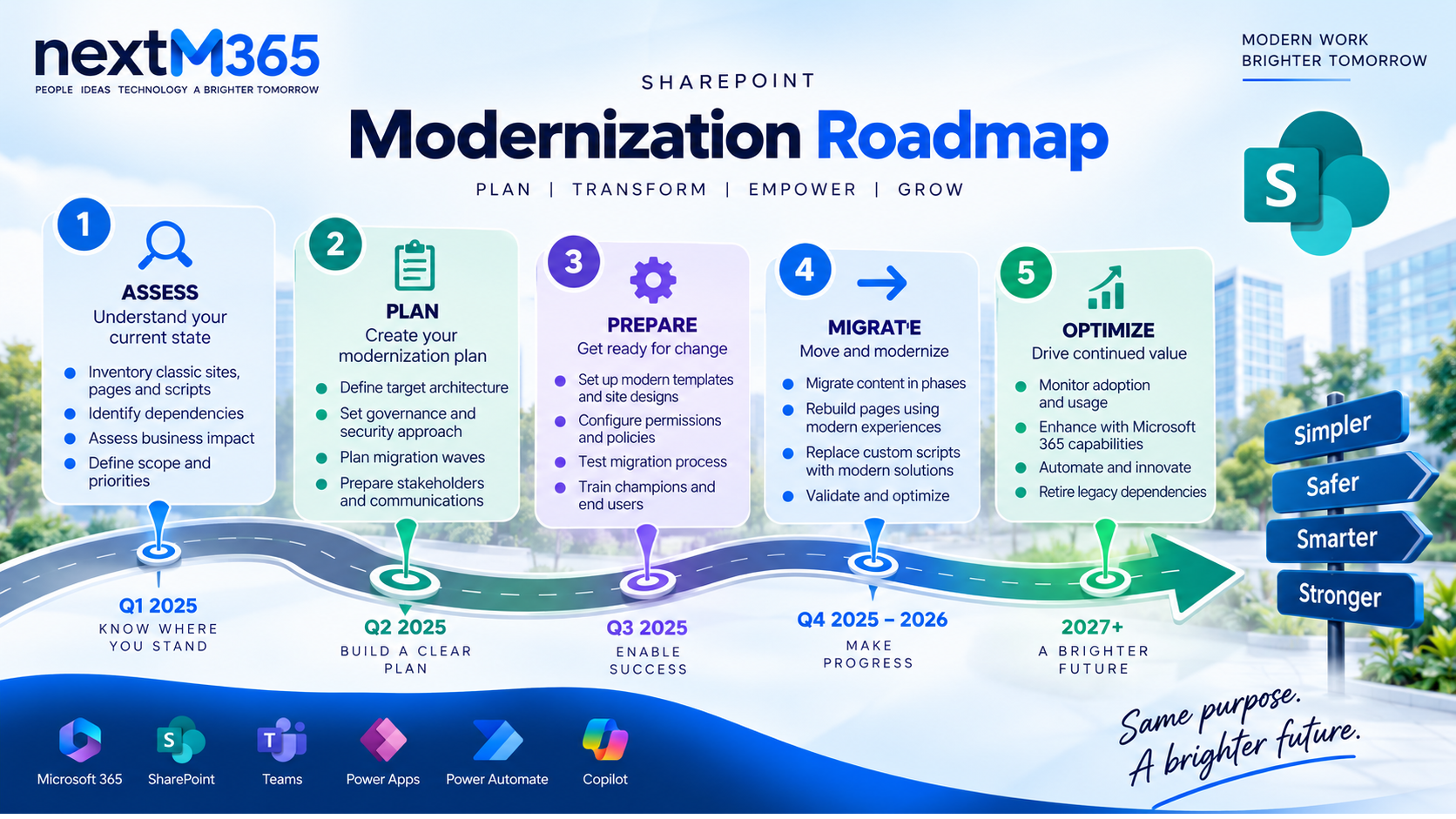
Practical modernization roadmap
Use the deadlines to create a practical delivery plan, not a last-minute conversion project.
- Inventory: find classic publishing sites, classic pages, custom ASPX files, script dependencies, page owners, traffic, and last edit dates.
- Assess: classify pages by business value, edit frequency, customization complexity, compliance relevance, and migration difficulty.
- Decide treatment: mark each page or page group as Retire, Replace, Modernize, or Rebuild.
- Design target architecture: define modern sites, hubs, navigation, metadata, templates, permissions, and publishing governance.
- Pilot: modernize a representative department or page group before scaling across the tenant.
- Validate: test content accuracy, links, search behavior, permissions, page performance, mobile rendering, analytics, and accessibility.
- Communicate: tell site owners what is changing, what they can still edit, and where new publishing should happen.
- Execute waves: migrate by business area or complexity level, then report progress against the March 2027 and October 2028 milestones.
Examples of modernization decisions
| Classic asset | Recommended decision | Reason |
|---|---|---|
| Old project wiki with no views in 18 months | Retire | Keeping it editable adds no business value. |
| HR policy landing page used weekly | Replace | A modern communication page with quick links and metadata is enough. |
| Department publishing page with current content | Modernize | The content matters, but the layout should move to modern SharePoint. |
| Classic page with JavaScript-driven request form | Rebuild | The page is really an app. Use Power Apps or SPFx with a proper data model. |
| Custom dashboard reading multiple Microsoft 365 sources | Rebuild | Use SPFx and Microsoft Graph with reviewed permissions and monitoring. |
Key takeaway
The key takeaway is that SharePoint Online classic experiences should now be treated as modernization candidates, not default building blocks. March 1, 2027 stops new classic publishing investment and affects new tenants. October 1, 2028 is the broader deadline for existing tenants because classic user-created pages become read-only and custom scripting restrictions expand.
Do not wait until the final year to start. Inventory now, prioritize what matters, retire what is stale, replace simple pages with modern SharePoint, modernize valuable content in waves, and rebuild true business applications with SPFx, Power Apps, Power Automate, Microsoft Graph, and governed Microsoft 365 architecture. For per-component modernization decisions, use the classic to modern migration strategy.
Related resources
Topics covered
Governance · Architecture · Security · Microsoft Graph · Integrations
Frequently asked questions
Are SharePoint Online classic experiences being retired completely?
No. Microsoft is not deleting existing classic content in these phases. The announced changes focus on classic publishing site creation, classic user-created pages, and custom scripting. Affected classic pages remain viewable but become read-only when the applicable phase applies.
When do classic SharePoint pages become read-only?
For new tenants created on or after March 1, 2027, users cannot create new classic pages from that date. For existing tenants, classic user-created pages become read-only beginning October 1, 2028.
Which classic SharePoint pages are affected?
The scope includes wiki pages, Web Part pages, blog pages, publishing pages, and custom ASPX pages created with SharePoint Designer or third-party solutions.
Are SharePoint list views and list forms affected?
Microsoft says list and library views, list form pages, and other classic experiences are not currently in scope. However, custom scripts embedded in those experiences are still subject to custom scripting changes.
What should replace classic SharePoint custom scripting?
Use modern SharePoint pages and web parts where possible. For custom UI and extensions, use SharePoint Framework. For forms and business apps, use Power Apps. For workflows, use Power Automate. For Microsoft 365 data integration, use Microsoft Graph with appropriate governance.
Sources
- Microsoft Learn: Introduction, Microsoft
- Microsoft Learn: Sharepoint, Microsoft
Have a Microsoft 365 topic idea?
Share article suggestions, community session ideas, corrections, or real-world scenarios for future nextM365 learning notes.
Keep learning Microsoft 365
Explore more practical tutorials for SharePoint, Power Platform, Copilot Studio, migration, automation, governance, and security.
Continue learning
Related tutorials