Understanding Omnichannel Deployment | Copilot Studio Day 55
Understand Copilot Studio omnichannel deployment across Teams, websites, custom apps, messaging, social channels, mobile apps, voice, contact center experiences, authentication, context, routing, handoff, testing, monitoring, and governance.
- Published
- Reading time
- 10 min read
Week 8 · Day 55 of 365 in 365 Days of Copilot Studio — view the full series
What you’ll learn
- What Is Omnichannel Deployment?
- Why Omnichannel Matters
- Multichannel vs Omnichannel
- Understand the Architecture
- Know Your Deployment Channels
On this page (22 sections)
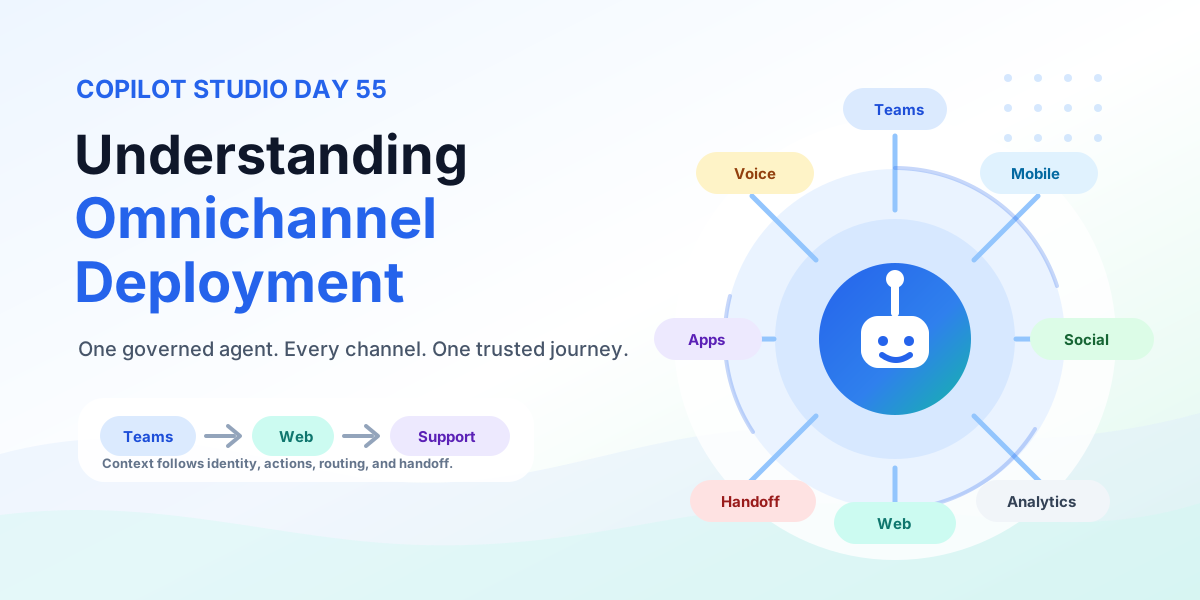
Day 55 of 365 Days of Copilot Studio explains Copilot Studio omnichannel deployment: how to make one agent available across many channels while keeping the experience consistent, secure, measurable, and useful.
Publishing to one channel is a deployment task. Publishing across many channels is an operating model. Your agent may appear in Microsoft Teams, a website, a custom app, a mobile app, a messaging channel, a social channel, voice, or a contact center. The goal is not just to be everywhere. The goal is to let users start anywhere, continue elsewhere, and still get the same trusted help.
This lesson connects the previous deployment posts: Day 51: Microsoft Teams, Day 52: Website, Day 53: Facebook Messenger, and Day 54: Custom Apps.
[!NOTE] Omnichannel deployment should feel like one assistant with many doors, not many disconnected bots wearing the same name.
What Is Omnichannel Deployment?
Omnichannel deployment means one Copilot Studio agent can serve users across multiple channels with a consistent experience. The agent can adapt the surface for Teams, web, mobile, messaging, voice, or support operations, but the underlying purpose, knowledge, actions, governance, and analytics remain aligned.
| Omnichannel promise | What it means | Why it matters |
|---|---|---|
| One agent everywhere | Reuse one governed agent strategy across approved channels. | Teams avoid rebuilding separate bots for each experience. |
| Consistent experience | Answers, actions, escalation rules, and tone stay aligned. | Users learn to trust the assistant across touchpoints. |
| Secure and compliant | Identity, permissions, data access, and audit stay controlled. | Business data is protected even when channels differ. |
| Better engagement | Users can choose the channel that fits their moment. | Adoption improves because support is closer to the workflow. |
Why Omnichannel Matters
Users do not think in channel architecture. They think in tasks. An employee may start in Teams, open a SharePoint page, move to a mobile app, and ask for human support. A customer may start on a website, continue in Messenger, and later call support. Omnichannel design keeps those journeys connected.
- Meet users where they are: put assistance into the channels people already use.
- Reduce duplicated builds: avoid separate disconnected assistants for every surface.
- Improve satisfaction: users get familiar behavior instead of relearning each channel.
- Increase business impact: route questions, actions, and handoffs to the right place faster.
Multichannel vs Omnichannel
Multichannel and omnichannel sound similar, but they create very different user experiences. Multichannel can mean many separate entry points. Omnichannel means those entry points work together.
| Area | Multichannel | Omnichannel |
|---|---|---|
| Agent model | Separate channel-specific assistants or disconnected deployments. | One connected agent strategy across approved channels. |
| Conversation context | Context often resets when the user moves channels. | Context is designed to follow the journey where appropriate. |
| User experience | Behavior, tone, and answers may vary by channel. | Experience stays consistent while the interface adapts. |
| Operations | Analytics and support queues can become siloed. | Monitoring, routing, and improvement use shared signals. |
Understand the Architecture
An omnichannel Copilot Studio architecture has four practical layers: channels, orchestration, business systems, and operations. Each layer needs ownership before production launch.
| Layer | Role | Examples |
|---|---|---|
| Channels | Where users interact with the agent. | Teams, website, mobile app, custom app, messaging, voice, contact center. |
| Agent orchestration | Handles topics, instructions, knowledge, actions, and conversation flow. | Copilot Studio topics, generative answers, actions, variables, fallback, escalation. |
| Business systems | Provide data and execute approved work. | CRM, ticketing, HR, ERP, SharePoint, Dataverse, APIs, Power Automate. |
| Operations | Controls quality, security, analytics, routing, and improvement. | Authentication, compliance, monitoring, human handoff, feedback loops. |
Know Your Deployment Channels
Not every agent belongs in every channel. Start with the channels that match the audience and the moment of need.
- Microsoft Teams and Microsoft 365: best for employees who work inside collaboration and productivity tools.
- Website: useful for public FAQs, customer support, lead intake, and service discovery.
- Custom apps: strong for workflow-specific assistance inside web, mobile, portal, or line-of-business apps.
- Messaging and social channels: useful where customers already communicate, ask questions, or request support.
- Voice and contact center: important for phone journeys, IVR, call routing, and agent-assisted support.
Teams and Microsoft 365 Channels
Teams and Microsoft 365 channels place the agent where work already happens. This is often the strongest internal deployment path because users already have identity, groups, permissions, and collaboration context.
Plan how the agent appears in Teams, whether it should support a personal scope, team scope, or broader organizational access, and how users will discover it. For Microsoft 365 experiences, also think about SharePoint, Outlook, Viva Connections, and related workflow entry points.
Website and Custom App Channels
Websites and custom apps bring the copilot into controlled digital experiences. A website deployment may focus on discovery and self-service. A custom app deployment may focus on contextual actions, authenticated records, and workflow completion.
The key decision is how much context and identity the channel needs. A public FAQ can be lightweight. A customer account portal, employee app, or business system needs authentication, authorization, secure data handling, and tighter testing.
Messaging, Social, Voice, and Contact Center
Messaging and social channels are conversational by nature, but they require strong operating discipline because they can be customer-facing and high volume. Voice and contact center experiences add another layer because users may need speech-friendly prompts, IVR routing, call transfer, and human agent context.
For these channels, design short responses, clear handoff, reliable escalation, and monitoring from day one. Users should never feel trapped in an automated loop when the conversation has moved beyond what the agent can safely solve.
Keep Conversations Consistent
Consistency is the heart of omnichannel deployment. A user should not get one answer in Teams and a conflicting answer on the website. The agent should behave like the same service, even when the interface changes.
- User identity: recognize the user when the channel supports authentication.
- Conversation context: carry useful state across supported journeys.
- Preferences: respect language, role, location, or service preferences when available.
- Business data: apply the same data rules across channels.
- Analytics: measure channel performance with shared definitions.
Design for Channel Differences
Omnichannel does not mean identical UI everywhere. A Teams conversation, mobile chat, website widget, Messenger thread, and voice call all need different interaction choices. The intelligence can stay the same while the experience adapts.
| Channel | Design focus | Common adjustment |
|---|---|---|
| Website | Clear page placement and support intent. | Use visible entry points and concise answer cards. |
| Teams | Business context and employee workflows. | Use organization language, permissions, and handoff paths. |
| Messaging | Short natural replies and mobile-first interaction. | Avoid long tables and use guided choices. |
| Voice | Speech-friendly flow and quick recovery. | Use clear prompts, confirmations, and simple menus. |
| Mobile app | Compact UI and fast task completion. | Keep responses scannable and actions thumb-friendly. |
Manage Conversation Context
Context makes omnichannel useful. If a user starts a request on the website and continues in Teams, the next channel should know enough to continue safely. That does not mean every detail should travel everywhere. It means the system should preserve useful, authorized context.
- Identify the user clearly: use the right identity model per channel.
- Capture useful context: keep topic, case, record, product, or request details where appropriate.
- Validate access: confirm the user can still see or act on the context in the new channel.
- Respect privacy: avoid moving sensitive content into channels that should not hold it.
Plan Authentication Across Channels
Authentication can vary by channel. Some experiences are anonymous. Some use Microsoft Entra ID. Some use customer identity, partner identity, or a token passed from a custom app. Decide this before launch.
| Pattern | Best for | Watch closely |
|---|---|---|
| No authentication | Public FAQs and low-risk information. | Do not expose account, employee, or private business data. |
| Microsoft Entra ID | Internal employee experiences. | Group membership, conditional access, and role-based data access. |
| External customer login | Portals and customer apps. | Account linking, consent, session handling, and token protection. |
| Channel-specific identity | Messaging, social, or contact center experiences. | Mapping channel identity to trusted business identity. |
Protect Business Data
Omnichannel deployment expands the places where users can ask for data or trigger actions. That makes security and compliance central design concerns.
- Use least privilege: the agent and actions should access only what they need.
- Control access: validate authorization before returning records or completing tasks.
- Classify data: know which content can appear in public, internal, or restricted channels.
- Prevent oversharing: mask sensitive fields and keep responses scoped.
- Audit and monitor: track usage, failures, escalations, and security events.
Connect Business Actions
The agent should do more than answer questions when the business case supports it. Omnichannel actions can create tickets, retrieve information, start approvals, update records, send notifications, schedule meetings, update CRM data, or create orders.
Actions need consistent rules across channels. A refund, account update, HR request, or support escalation should not become less controlled just because it started in a messaging app instead of Teams.
Plan Human Handoff
Human handoff is part of the user experience, not a failure state. Define when the agent should transfer the conversation, where the user should go, and what context should travel with the handoff.
- Define triggers: escalation requests, low confidence, sensitive topics, repeated fallback, high urgency, or policy limits.
- Transfer context: include the user, issue, channel, conversation summary, and relevant business record where allowed.
- Set expectations: tell users what happens next and how long it may take.
- Measure escalation: track volume, resolution, wait time, and recurring topics.
Route Conversations Intelligently
Routing sends the right conversation to the right destination. In omnichannel operations, routing may depend on topic, channel, customer segment, urgency, language, region, user type, agent availability, and business priority.
Good routing helps users reach the right expert faster. It also helps support teams prioritize high-value or high-risk conversations instead of treating every request the same.
Test Every Channel
Testing must happen in the real channels users will touch. Authoring canvas tests are helpful, but they do not prove that channel formatting, authentication, context, handoff, and telemetry work in production conditions.
- Validate conversation flows and fallback behavior.
- Test authentication and authorization with real user roles.
- Confirm content and context stay accurate.
- Run connected actions end to end.
- Check performance, accessibility, security, and compliance signals.
Test Cross-Channel Journeys
The real test of omnichannel design is movement. Can a user start on the website and continue in Teams? Can a mobile user move to human support without repeating the whole problem? Can a social conversation become a routed support case?
For each cross-channel scenario, validate continuity, access, context preservation, notification behavior, audit logging, and the final outcome. If the user has to restart from zero every time, the experience is multichannel rather than omnichannel.
Monitor Omnichannel Performance
Monitoring tells you which channels are useful, where the agent fails, and what should improve next. Track both conversation quality and operational health.
| Metric | What it shows |
|---|---|
| Total conversations and active channels | Adoption and channel reach. |
| Fallback rate and response time | Quality, content gaps, and performance friction. |
| Resolution rate and successful actions | Business value and automation impact. |
| Human handoff and satisfaction | Escalation quality and user confidence. |
| Security events | Authentication, authorization, and compliance issues. |
Improve From Real Conversations
Omnichannel deployment is never finished on launch day. Real conversations reveal where users get stuck, which channels matter most, and which topics need better design.
- Collect conversations: review transcripts, feedback, support tickets, and analytics.
- Analyze patterns: identify repeated questions, missed intents, routing issues, and action failures.
- Improve flows: refine topics, prompts, actions, and handoff triggers.
- Update content: keep knowledge sources current and remove conflicting answers.
- Monitor results: confirm the change improves resolution, satisfaction, or adoption.
Production Checklist
- Deployment channels are selected based on audience and user journeys.
- Authentication is configured for each channel.
- Data protection and least-privilege access are in place.
- Business actions are connected, tested, and governed.
- Human handoff is enabled with context transfer where appropriate.
- Routing rules are configured for topic, urgency, audience, language, and availability.
- Every channel is tested end to end.
- Cross-channel journeys are validated for continuity and access.
- Monitoring and analytics are ready before launch.
- Improvement ownership is assigned after production release.
Key Takeaway
The key takeaway from Day 55 is simple: one agent, every channel, one consistent experience. Omnichannel deployment is not just about publishing Copilot Studio everywhere. It is about designing a trusted, secure, connected support experience across Teams, websites, custom apps, mobile apps, messaging, social channels, voice, contact center, and human support.
When context, identity, actions, routing, handoff, analytics, and governance work together, the copilot becomes more than a channel feature. It becomes a consistent assistant that follows the work.
Related resources
Topics covered
AI Agents · Integrations · Teams · Security · Governance
Frequently asked questions
What is omnichannel deployment in Copilot Studio?
Omnichannel deployment means making one Copilot Studio agent available across multiple channels while keeping the experience, context, security model, actions, analytics, and operating process consistent.
How is omnichannel different from multichannel?
Multichannel usually means separate experiences in separate channels. Omnichannel means one connected agent strategy where users can move across channels without losing identity, context, quality, or support continuity.
Which channels should I plan for?
Common channels include Microsoft Teams, Microsoft 365 experiences, websites, custom apps, mobile apps, messaging and social channels, voice, contact center experiences, and human support queues.
What should stay consistent across channels?
User identity, conversation context, business data access, security rules, core answers, action behavior, escalation rules, analytics, and governance should remain consistent even when the UI adapts by channel.
What should be tested before omnichannel production launch?
Test every channel, cross-channel journeys, authentication, authorization, context transfer, connected actions, routing, human handoff, performance, accessibility, monitoring, and compliance reporting.
Sources
Have a Microsoft 365 topic idea?
Share article suggestions, community session ideas, corrections, or real-world scenarios for future nextM365 learning notes.
Keep learning Microsoft 365
Explore more practical tutorials for SharePoint, Power Platform, Copilot Studio, migration, automation, governance, and security.
Continue learning
Related tutorials
Related questions
Related comparisons